Pax Invaders Adept Squad Assembly Instructions


These instructions are for the Pax Invaders Adept Squad kit for the R*MIL MEN toy line.
TOOLS NEEDED:

-
Hobby Clippers (for cleaning and removing support bits)
-
Superglue (in case of broken pieces or if some parts are too loose)
PARTS NEEDED IN THESE STEPS:


-
If you have the Adept kit with the floating Psion, you need the Infantry Bases 3 sprue, and the Adept Squad sprue with the floating Psion, which labels the floating legs with an F.


-
If you have the Adept kit with the walking Psion, you need the Infantry Bases 1 sprue, and the Adept Squad sprue with the walking Psion, which labels the walking legs with a W.

-
The sprue is organized so the arms for the Adept's torsos are next to each other, and their intended legs are nearby. You can experiment with different poses by switching up the legs and torsos. However the Psion parts at the bottom are exclusive.


-
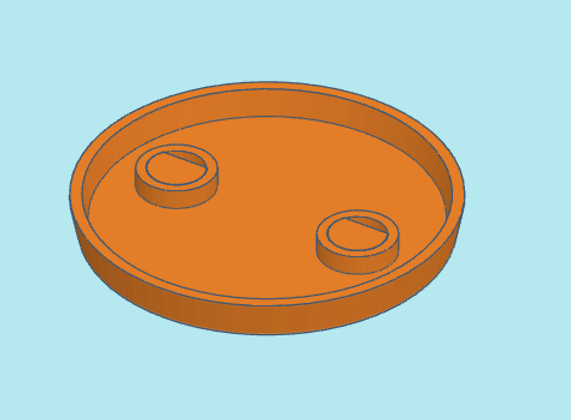
The Adepts and walking Psion all use the Infantry base type 1. First insert a base peg into the hole on an infantry base. It needs to be seated all the way in to where it's flush with the bottom, as pictured.
-
Repeat for the other hole.

-
When flipped over, the base should have 2 pegs sticking up.


-
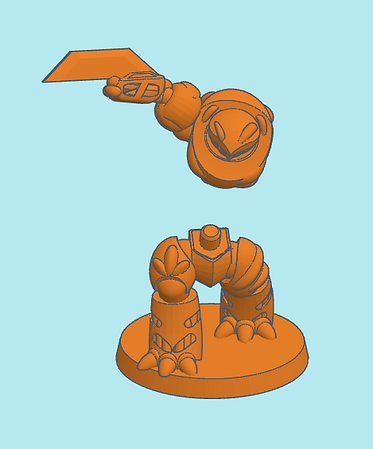
Snap on Adept legs to base. If the fit is too loose, apply some superglue to the feet pegs.

-
Snap on the Adept torso to the legs. If the fit is too loose, apply some superglue to the waist peg.


-
Snap on the arm to the torso as shown. If the fit is too loose, apply some superglue to the arm peg.

-
Assemble the rest of the Adepts using similar steps to above.


-
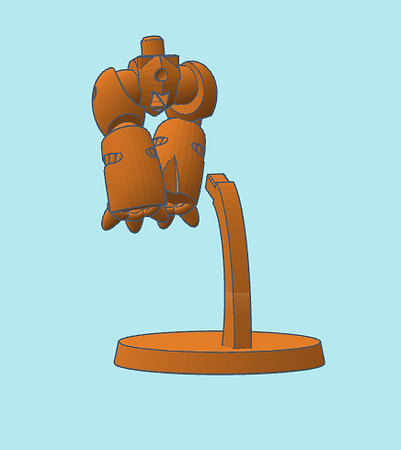
If you have the floating Psion, first assemble the flying base by inserting the flying stem into the base square hole. If the fit is too loose, apply some superglue to the stem peg.

-
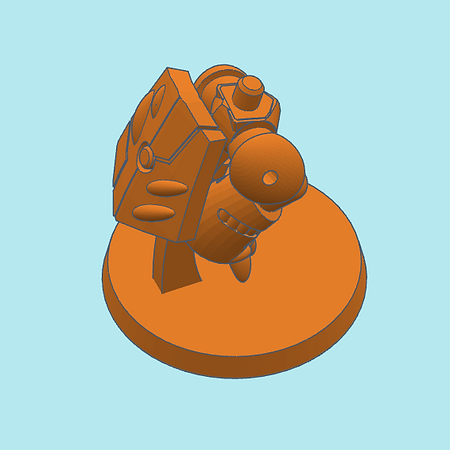
Insert the flying stem into the lower square hole on the floating Psion legs. If the fit is too loose, apply some superglue to the stem peg.

-
Snap on the rear shield to the upper round hole above the square peg hole. If the fit is too loose, apply some superglue to the shield peg.


-
Snap on the side wings to the leg's thigh holes as shown. If the fit is too loose, apply some superglue to the wing pegs.


-
Snap on the Psion torso to the waist peg as shown. If the fit is too loose, apply some superglue to the waist peg.


-
Snap on the arm to the Psion torso as shown. If the fit is too loose, apply some superglue to the arm peg.


-
Insert the pole blade into the hand of the Psion as shown. If the fit is too loose, apply some superglue to the shaft as it's entering the hand.

-
If you have the walking Psion, assemble it using similar steps above. Your Adept squad is now complete.
-
If you have further kits to assemble, return to the R*MIL MEN main menu for assembly instructions.
